Ideal Scope

Contents

Ideal Scope Order is the arrangement of Budget Elements with the GL Account, or Object, being at the bottom of the Budget Element order. In the Financial Grid, this order provides a clean uncluttered look when viewing full details. When the last Budget Element is set as optional, ESP™ will automatically include items based on the default Element Id.
1.With the Financial grid selected, open the Scope Selection window by clicking the  ,Scope button on the Scope toolbar, or select View>Scenario Scope... from the main menu.

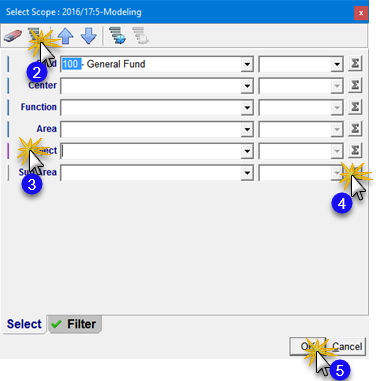
Select Ideal Scope
2.In the Select Scope window Ctl-click on the Set Default Scope button in the Toolbar to ensure your default Scope is set.
3.In the same window, holding the left mouse button down, click and drag the Object element to the bottom position of the list.
4.Click on the lowest Summing button making sure all the Summing buttons are gray.
5.Click OK to set your Ideal Scope.
 Results:
1.Your Financial Grid now shows your selected Scope ordered with the Object element as the last Element in the hierarchy.
|
If there are any items in your data grid that have the last element Id other than a default of '000', then they will show up below the Object in the hierarchy. |
